
Publish an eBook in 2026 involves edit your manuscript, format it as an accessible EPUB, and create a cover with compelling metadata. Choose Amazon KDP, Apple Books, Kobo, Google Play Books, or an aggregator, then upload, preview, set pricing and rights, publish, and promote it using reader and sales data.
Why Ebooks Matter in 2026
Due to the flexibility and screen responsiveness aspect of the ebook, reads and authors have shown their preference for it. Whether you are a reader or an aspiring author, there’s no two cents on the importance of it. You can access it anywhere, on any device, at anytime. This aspect solves the modern readers’ problem as a business professional, ebook works as a marketing tool as well. A strong ebook can help you:
- show your expertise
- reach more people online
- Grow your email list
- support your business offers
- build trust with new readers
- earn money from book sales
- Present your content in an easy-to-read manner.
- Give instant access to your readers
Ebook Publishing Guide: Start with the Right Goal
Before you format anything, ask one key question: Why are you publishing this ebook? Your answer will shape the whole book.
The ebook publishing process is more than uploading a file.
It usually includes:
- writing or finishing the manuscript
- editing the content
- designing the cover
- formatting the file
- choosing where to sell it
- setting the price
- publishing and promoting it
That’s the full path from idea to finished ebook publication.
Some authors do all of this on their own. Others hire help. Both paths can work.
Common goals for business authors
Many business professionals publish ebooks to:
- share a method or system
- attract leads for a service
- support a coaching or consulting offer
- build authority in a niche
- create passive income
- turn a talk, workshop, or blog into a book
If your goal is lead generation, your ebook may be shorter and more focused. If your goal is direct sales, you may want a fuller book with more detail and polish.
Know who the book is for
It is widely understood that a good book solve atleast one problem for one specific reader. When you are thinking of writing, publishing, or marketing your book, ask yourself:
- Who is this book for?
- What problem do they have?
- What result do they want?
- What simple steps can I teach?
When you know your reader, writing gets much easier. Your title, chapters, tone, and examples all become clearer.
How to Publish an Ebook: Step 1 — Write a useful book
A good ebook does not try to say everything. It says the right things in the right order.
Pick one core topic
Don’t make your book too broad. When you’re working on a specific, narrowed-down topic, you can easily complete it without getting distracting in the middle. For example, instead of:
- “Marketing for Small Business”
try:
- “How Local Shops Can Get More Customers with Email Marketing”
A narrow topic helps readers know the book is for them.
Make a simple outline.
An outline is your roadmap. It shows what goes where.
A basic outline might look like this:
- Introduction
- The problem
- Why it happens
- The solution
- Step-by-step plan
- Common mistakes
- Tools or examples
- Final action steps
You don’t need a perfect outline. You just need one that keeps you moving.
Write in a clear, friendly voice.
Use simple words. Keep your chapters easy to follow. Break big ideas into short parts.
Try to:
- Use short paragraphs
- use examples
- explain new terms the first time
- avoid jargon
- Stick to the main topic
Let your reader have room for breath. Your reader doesn’t have to read and reread everything. They need to stop when the book becomes hard to follow.
Make Your Book Valuable
Readers love books that help them do something.
After each chapter, ask:
- What did the reader learn?
- What can they do next?
- Did I make this easy to understand?
A helpful ebook is often more valuable than a fancy one.
Step 2 — Edit Your Ebook Before You Publish It Online
You don’t have to make a rookie mistake by publishing your book too soon. Your first draft is not equal to the final manuscript.
Types of Editing
It helps to know the main kinds of editing:
Developmental Editing
This looks at the big picture. It checks your structure, flow, message, and chapter order.
Copy Editing
It is one of the most important types of editing. It allows you as an author to improve your overall sentence structures, grammar, and word choices, and bring consistency and clarity to your content.
Proofreading
Once you have gone through the above types of editing, this skill allows you to produce a refined and polished version of your work. It also allows you to catch tiny mistakes like typos, correct spacing issues, and find missing words.
It is possible that you may not need all three types of editing. But it is observed that ebooks usually require one or a combination of these review services.
Self-editing Tips
Before hiring help, do your own cleanup.
Try these steps:
- Read the book out loud
- Cut repeated ideas
- shorten long sentences
- Check chapter titles
- Make sure each chapter leads to the next
- fix unclear parts
Then ask a few trusted readers for feedback. Beta reading before the book’s publication proves to be beneficial for the authors and publishers alike.
Step 3 — Choose the Best Format for Ebook Publication
There are multiple ways to document your ebook for publication. You can use Google Docs, Microsoft Word, or any other writing tool. No matter which tool you use to document your work, you need to make sure that you’re able to export your work in the standard publishing format.
Common Ebook File Types
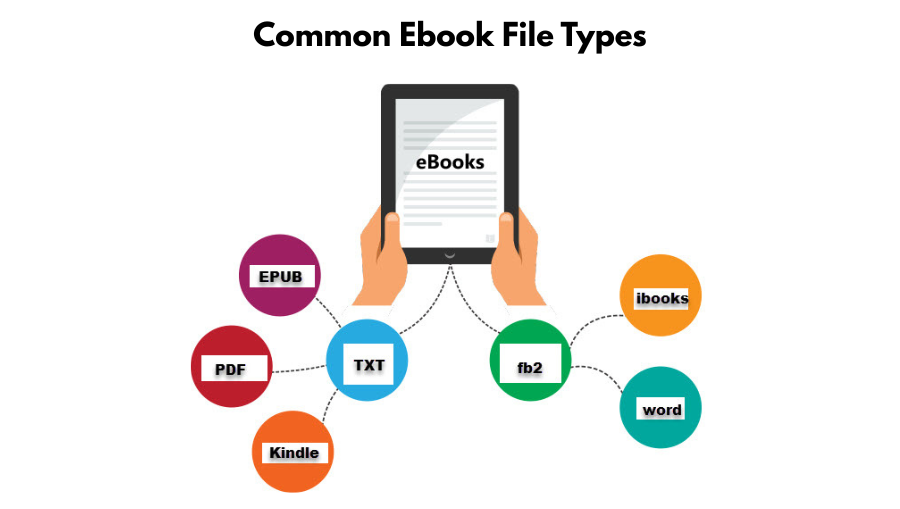
EPUB
EPUB is one of the most common ebook formats. Many stores and apps use it. It adjusts to different screen sizes, which makes it reader-friendly.
PDF keeps the layout fixed. It’s great for guides, workbooks, and books with lots of charts or design elements. But it may not read as smoothly on small screens.
MOBI or KPF
These are tied to Amazon tools and Kindle publishing systems. Amazon has changed its tools over time, but the main idea is this: you may need a Kindle-ready file for Amazon.
Reflowable vs fixed layout
These terms sound technical, but they’re simple.
- Reflowable means the text moves to fit the screen.
- Fixed layout means the design stays in one exact place.
Most text-heavy ebooks use a reflowable layout. Visual books, manuals, and illustrated guides may use a fixed layout.
Step 4 — Design a Cover That Helps Sell Your Book
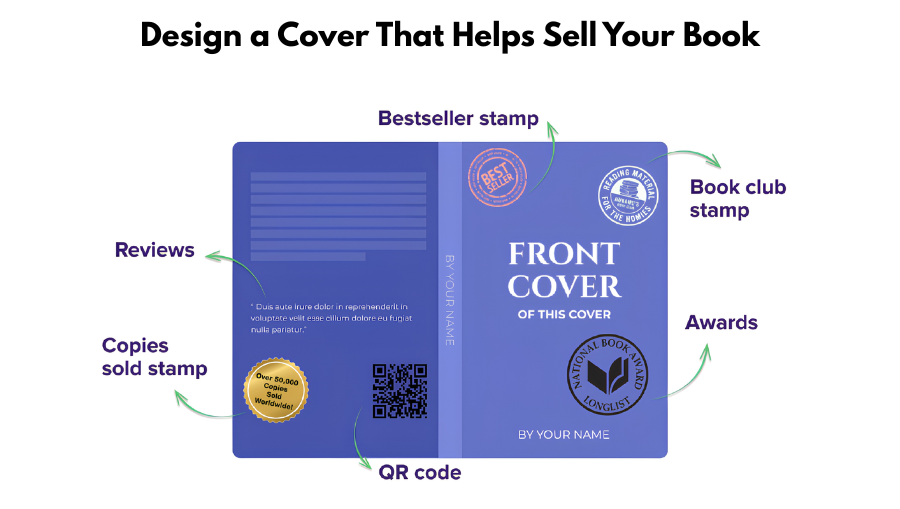
People do judge a book by its cover.
Your cover is one of the first things readers see on search pages and store listings. A weak cover can hurt a strong book.
What makes a good ebook cover
A good cover should:
- look clear at a small size
- have a strong title
- use easy-to-read fonts
- fit your topic and audience
- look professional, not homemade
If your book is for business readers, the cover should feel clean and credible.
Step 5 — Format Your Manuscript for Ebook Publishing Platforms
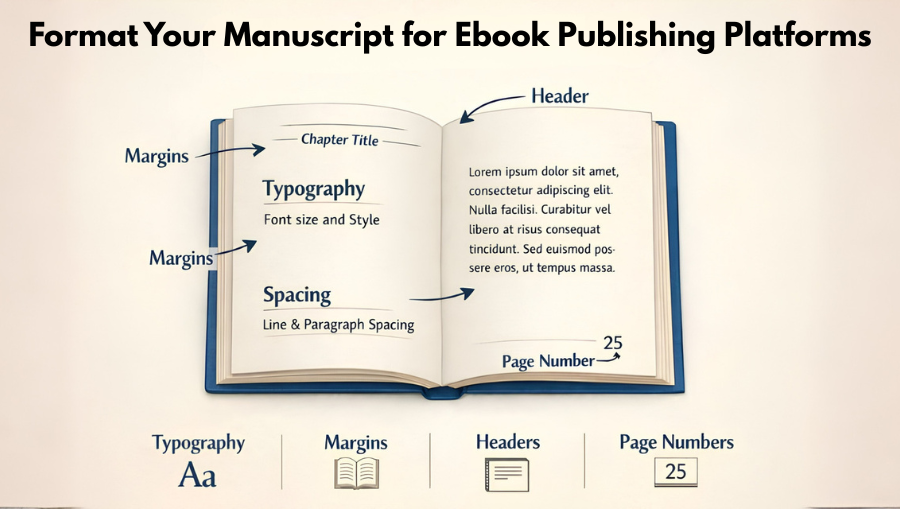
Formatting means turning your manuscript into a clean, readable ebook file.
This step matters more than many authors expect. A badly formatted book can lead to poor reviews, even if the content is great.
Good formatting includes:
- clickable table of contents
- clean chapter breaks
- consistent fonts
- working links
- proper spacing
- no broken images
- no random page jumps
Tools for formatting
Some authors use:
- Word export tools
- Vellum
- Atticus
- Kindle Create
- professional formatting services
The best tool depends on your tech comfort and budget. If you want full control, learn a tool. If you want speed, hire an expert.
Step 6 — Pick Where to Publish the Ebook Online
Here are some of the most common places authors use to publish an ebook online.
Publish an ebook on Amazon
Amazon KDP is a widely accepted and endorsed platform by millions of readers and authors. Why authors choose Amazon:
- A huge global audience
- easy self-publishing system
- fast setup
- trusted platform for buyers
- strong search visibility inside Amazon
Things to think about:
- Lots of competition
- Platform rules matter
- Your book page needs strong keywords and a good description
- Exclusivity options may limit where else you sell
For many authors, Amazon is a smart place to begin. It can give your book visibility fast, especially if you also have a strong launch plan.
Apple Books
Apple Books is another well-known platform. If your audience is available on apple ecosystem, then Apple Books is a good place to start. The Apple Store offers a smooth reading experience to its readers.
Google Play Books
As compared to Apple Books, Google Play Books helps you capture your Android users and readers buying through Google.
Barnes & Noble Press
This platform gives authors another direct retail option, especially in the U.S.
Sell direct from your own website
You can also sell your ebook yourself using your own site.
This gives you:
- more control
- direct customer data
- better connection with readers
- flexible pricing and bundles
But it also means you must handle more of the sales and marketing work.
Aggregators and Distributors
Some services help you send your ebook to many stores at once. These are sometimes called distributors or aggregators.
They can save time, but they may take a cut or offer less direct control than publishing to each store yourself.
- How to choose the right platform
If you’re wondering whether you’ve decided to publish your book on the right platform, then ask yourself some of these questions:
- Do you want the biggest audience?
Amazon may be your best starting point.
- Do you want to sell in many stores?
You may want to go wide, which means publishing on several platforms instead of one.
- Do you want reader data and direct sales?
Selling from your own website may matter most.
- Do you want the easiest setup?
A single platform is often simpler than managing many.
- Do you want help?
Some ebook publishing services handle the upload and setup for you.
Step 7 — Understand the Ebook Publishing Process From Upload to Launch
Once your book is completely edited, designed, and formatted, the next logical step is book publishing.
Create your author account
You’ll sign up on your chosen platform and fill in payment and tax details.
Add your book details
You’ll enter:
- title
- subtitle
- author name
- description
- keywords
- categories
- language
- age range if needed
This data helps readers find your book.
Upload files
You’ll upload:
- manuscript file
- cover file
The platform may also show a preview so you can check how the book looks.
Set your price
You’ll choose the list price and any region-based pricing options.
Review rights and territories
This tells the platform where you have the right to sell the book.
Hit publish
After review, your ebook goes live. Some platforms publish fast. Others take longer.
How to write a strong book description
Your book description is part sales page, part summary.
A good one should:
- grab attention fast
- show the reader’s problem
- explain what the book helps them do
- make the next step feel easy
A simple structure that works
Try this:
- Start with the reader’s problem
- Show the promise of the book
- Share what they will learn
- End with a reason to buy now
Keep it clear. Keep it focused. Don’t turn it into a life story.
Step 8 — Set the Right Price for Your Ebook
Pricing is not random. It affects sales, value, and profit.
What shapes ebook pricing?
Your price may depend on:
- your niche
- your audience
- book length
- author brand
- direct sales or store sales
- launch goals
- platform rules
A short lead-generation ebook may even be free. A premium expert guide can be priced higher if the value is clear.
Pricing strategies to consider
Low-price launch
A lower launch price can help you get early readers and reviews.
Premium price
If your book solves a valuable business problem, you may price it higher.
Free lead magnet
Some businesses use a free ebook to build trust and collect email subscribers.
Ebook publishing cost: what should you expect?
The ebook publishing cost can be very low or fairly high. It depends on how much you do yourself.
Common cost areas
You may spend money on:
- editing
- cover design
- formatting
- ISBN if needed
- marketing
- author website tools
- paid ads
- upload help or publishing support
Low-budget path
A lean path may include:
- self-editing
- simple cover tools
- DIY formatting
- one main platform
- free launch promotion through email and social media
Mid-range path
A more polished path may include:
- freelance editor
- custom cover
- pro formatting
- launch graphics
- email marketing tools
Higher-end path
Some business authors invest more in speed and quality. They may hire full ebook publishing services to manage editing, design, formatting, and setup.
The good news is this: you can publish at many price points. You do not need a huge budget to begin.
Step 9 — Decide Whether You Need an ISBN
An ISBN is a book identification number. It helps track books in the market.
Do all e-books need one? Not always.
Some platforms do not require an ISBN for ebooks sold on their system. Others may let you use one if you want broader distribution or more publishing control.
When an ISBN may help
You may want one if:
- You plan a wide distribution
- You want more control over metadata
- You want your own publishing imprint
- You plan print versions too
When you may skip it
You may skip it if:
- Your chosen platform doesn’t require it
- if you’re testing a first ebook
- you’re selling direct in a simple setup
Check the rules of each store before you decide.
Step 10 — Use Ebook Publishing Services if You Want Support
Not every author wants to do every step alone.
That’s where ebook publishing services can help.
What these services may include
Depending on the provider, services can include:
- manuscript review
- editing
- ghostwriting
- cover design
- formatting
- upload support
- metadata help
- launch strategy
- marketing support
Who should consider these services?
They can be a good fit for:
- busy founders
- consultants
- executives
- first-time authors
- experts who want help shaping ideas into a strong book
What to watch for
Not all services are equal. Before hiring anyone, ask:
- What is included?
- Who owns the files?
- What rights do I keep?
- What is the timeline?
- What results should I expect?
- Are there hidden fees?
A good service partner should be clear, honest, and easy to work with.
Step 11 — Make Your Ebook Easier to Find With Smart SEO
SEO means search engine optimization. In simple terms, it means helping people find your content through search.
Yes, SEO matters for ebooks too.
Where SEO helps
SEO can support:
- Your book sales page
- your website landing page
- blog posts that lead to the book
- Amazon listing keywords
- discoverability in search results
Use keywords naturally
Your core phrase here is how to publish an ebook, but don’t force it into every paragraph. Use it where it fits.
You can also use related phrases like:
- ebook publishing guide
- publish an ebook online
- ebook publishing platforms
- Publish an ebook on Amazon
- ebook publication
- ebook publishing process
- ebook publishing cost
- ebook publishing services
These help search engines understand your topic without making the writing sound repetitive.
Places to use keywords
Use key phrases in:
- title
- headings
- first paragraph
- book description
- image file names
- page URL
- meta title
- meta description
Write for humans first
Good SEO is not about stuffing the same phrase again and again. It’s about making the page useful, clear, and easy to scan.
If readers stay on the page and find what they need, that’s a strong sign your content works.
Step 12 — Build a Launch Plan Before Your Ebook Goes Live
A good ebook does not sell itself just because it exists.
You need a simple launch plan.
What a launch plan can include
Your launch may include:
- email announcements
- social media posts
- a landing page
- early reader reviews
- podcast guest spots
- blog content
- partner shares
- bonus offers for launch week
Start early
Don’t wait until the book is live. Warm up your audience first.
You can share:
- behind-the-scenes writing updates
- book cover reveal
- sample tips from the book
- launch date countdown
- early sign-up page
Ask for reviews the right way
Reviews build trust. If your platform allows it, ask early readers to leave honest reviews after launch.
Never fake reviews. Never pressure people. Just ask kindly.
Step 13 — Promote Your Ebook After Publication
A launch is just the start.
The best ebook marketing keeps going after the first week.
Simple ways to promote your ebook
Use your email list
Email is one of the best tools for book promotion. Your subscribers already know you.
Write blog posts around the book topic
Turn key ideas from the ebook into helpful blog posts. Link back to the book page.
Share short tips on social media
Break your book into bite-size lessons. One chapter can become many posts.
Speak on podcasts or webinars
Talk about the problem your book solves. Mention the ebook as a next step.
Add the book to your website
Place it on your home page, about page, services page, and blog sidebar if it fits your site design.
Use the book in your sales funnel
A sales funnel is the path people take from finding you to buying from you. Your ebook can be the first step.
Step 14 — Common Mistakes to Avoid
Many new authors make the same mistakes. You can save time by spotting them early.
Mistake 1: Writing for everyone
When your book tries to help everybody, it often helps nobody. Pick one clear reader.
Mistake 2: Publishing before editing
Typos, weak structure, and unclear ideas hurt trust.
Mistake 3: Using a poor cover
A weak cover lowers clicks and sales.
Mistake 4: Choosing the wrong platform
Think about your real goals before you publish.
Mistake 5: Skipping the description
Your description sells the value of the book. Don’t rush it.
Mistake 6: No marketing plan
Even a strong ebook needs promotion.
Mistake 7: Giving up too soon
Books often grow over time. Keep promoting, testing, and improving.
Publish ebook on Amazon or go wide?
This is one of the biggest questions authors ask.
What does “go wide” mean?
Going wide means selling your ebook on more than one platform instead of relying on a single store.
When Amazon-first makes sense
You may want to publish ebook on Amazon first if:
- You want a simple start
- Your audience shops there
- You want a quick setup
- You are testing the market
When wide distribution makes sense
You may want wider distribution if:
- You want more control
- You want to reach readers across many stores
- You don’t want to depend on one company
- Your brand already has traffic from many channels
There is no perfect choice for everyone. Pick the path that best fits your goals now. You can always adjust later.
A simple checklist for ebook publication
Here is a basic checklist you can follow:
Before publishing
- finish the manuscript
- edit the content
- get feedback
- design the cover
- format the ebook
- Write the description
- choose keywords
- decide on price
- Choose your platform
During setup
- Create your account
- Add book details
- upload files
- Preview the ebook
- review rights
- publish
After launch
- Share with your email list
- post on social media
- ask for reviews
- track sales
- Update the listing if needed
- Keep promoting the book
How business professionals can use an ebook to grow authority
If you are a business leader, coach, consultant, or service provider, your ebook can do more than sell copies.
It can also:
- open speaking doors
- support client trust
- lead into courses or programs
- help media see you as an expert
- Give your audience a low-risk way to learn from you
That means your ebook is not only a product. It can also be a business asset.
Think beyond book sales
Ask yourself:
- Can this book lead to workshop bookings?
- Can it support a consulting offer?
- Can it help qualify leads?
- Can it become a series?
- Can I use parts of it in training materials?
When you think this way, your ebook becomes even more valuable.
How long should an ebook be?
There is no magic length.
A strong ebook is as long as it needs to be and no longer.
Good questions to ask
- Did I solve the reader’s problem?
- Did I explain the steps clearly?
- Did I remove filler?
- Is it easy to read?
Some ebooks are short and still very useful. Others need more depth. Value matters more than page count.
Should you write it yourself or hire help?
Both options are valid.
Write it yourself if:
- You enjoy writing
- You know your topic well
- You have time to draft and revise
- You want full control of your voice
Hire help if:
- You have strong ideas but little time
- Writing feels hard
- You want a faster path
- You need help shaping your message
You might hire:
- an editor
- a ghostwriter
- a formatter
- a cover designer
- full ebook publishing services
The best setup is the one that helps you finish.
What makes an ebook successful?
Success means different things for different authors.
For one person, success may mean 1,000 sales. For another, it may mean three new clients. For another, it may mean finally becoming a published author.
Still, strong ebooks often share a few traits.
A successful ebook is:
- focused
- useful
- clear
- well-edited
- professionally presented
- easy to buy
- matched to the right audience
It also has a promotion plan behind it.
Final Thoughts on How to Publish an Ebook With Confidence
Learning how to publish an ebook does not have to feel hard. When you break it into steps, the path gets much clearer. Start with a useful topic. Write for one reader. Edit with care. Choose the right ebook publishing platforms. Set a smart price. Then launch and keep promoting.
A good ebook can build trust, grow your brand, and create new business opportunities for years to come.
If you want expert help turning your ideas into a polished, professional book, connect with Blue Mount Publishers today. We can help you move from rough draft to strong ebook publication with clarity and confidence.
Frequently Asked Questions About Publish an Ebook
- How much does it cost to publish an ebook?
The cost can range from very low to quite high. It depends on how much work you do yourself and how much help you hire. If you edit your own manuscript, make your own cover, and format the file on your own, your cost may stay small. If you hire an editor, designer, and formatter, the total can rise fast. You may also spend money on marketing, software, or ebook publishing services. The good part is that you can start simple and invest more later as your book grows.
- Can I publish an ebook for free?
Yes, you can publish an ebook for free in many cases. Some platforms let you upload your book without charging upfront. That means you can write your manuscript, format it, create a basic cover, and publish without paying a platform fee. Still, “free” does not always mean no cost at all. You may still want to spend money on editing, design, or promotion. If your budget is tight, you can begin with free tools and improve the book over time as you learn what readers want.
- Where can I publish my ebook?
You can publish your ebook on several kinds of platforms. Many authors start with Amazon because it is easy to use and has a large audience. Others also use Apple Books, Kobo, Google Play Books, or Barnes & Noble Press. You can also sell the ebook from your own website if you want more control over pricing and customer data. Some authors use distributors to send the same book to many stores at once. The best place depends on your goals, your audience, and how much control you want.
- Can I publish an ebook without an ISBN?
Yes, in many cases, you can publish an ebook without an ISBN. Some ebook platforms do not require one for digital books sold through their system. That makes it easier for first-time authors to get started. Still, an ISBN can be helpful if you want wider distribution, more control over your publishing identity, or a stronger record for your book across different sales channels. Before you decide, check the rules of the platform you plan to use. It’s smart to match the ISBN choice to your long-term publishing plan.
- How long does it take to publish an ebook?
The timeline depends on the book and your process. If your manuscript is already finished and only needs light editing, you may be able to publish in a few days or weeks. If you are starting from scratch, the full process may take several weeks or a few months. Writing, editing, cover design, formatting, and setup all take time. Rushing often leads to mistakes. A better goal is to move at a steady pace, finish each step well, and publish when the book is truly ready for readers.